Make your digital business card online
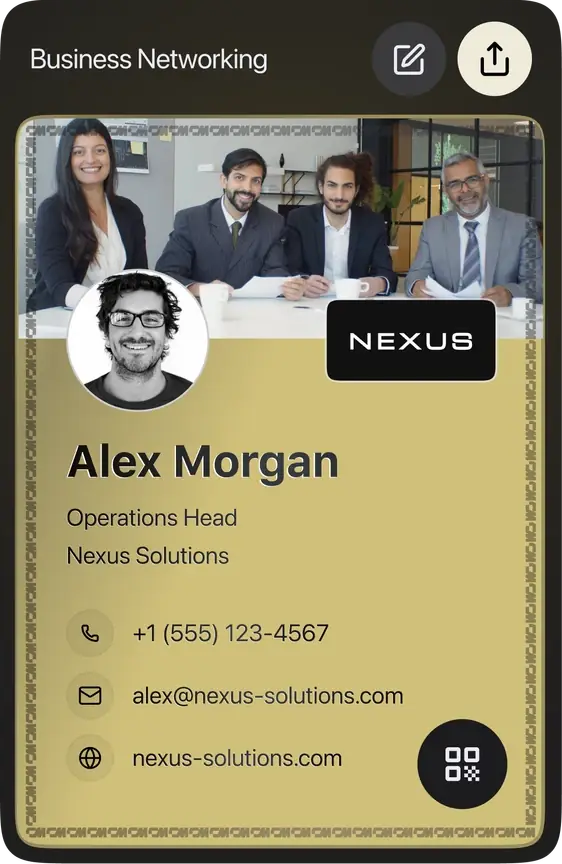
Fill in your details and watch your card update live as you type. Preview shows the card front. Everything you add is visible on your shared card
We filled in some details from the link. Check them, add your email or phone, and create it.




What you get
A live digital business card with its own share link and QR code, a PNG download of the card and the QR, and a pass for Apple Wallet or Google Wallet through our free wallet tool.
What needs an account
Saving your card creates a free ConnectMachine account from your email or phone. Sign in later with a one-time code to edit the card on the web or in the iOS and Android apps. The free plan has no monthly fee.
Free plan, no monthly fee
The card you make here stays free. The ConnectMachine free plan has no monthly fee and no time limit, and you don't need a credit card to start.
- Up to 4 digital business cards, for example one for work and one for events
- Share by QR code or link; the people you share with don't need an app
- Up to 3 paper card scans to try the business card scanner
- Add your card to Apple Wallet or Google Wallet with the free wallet tool
If you need more, the Individual plan is $5.99 a month, or $5 a month billed annually, and adds unlimited cards and scans, AI Concierge, AI Notetaker, Wallet passes in the app and CSV export.
Digital business card examples by role
Start from an example close to your job. Each one opens the maker with your title filled in, so you only add your own details.
| Role | Title on the card | What to add | Links |
|---|---|---|---|
| Realtor | Realtor | License number, brokerage, link to your listings | Try this exampleGuide |
| Lawyer | Attorney | Practice area, bar admission, booking link | Try this exampleGuide |
| Sales rep | Account Executive | Direct line, calendar link, LinkedIn | Try this exampleGuide |
| Consultant | Consultant | Specialty, case studies link, calendar link | Try this exampleGuide |
| Photographer | Photographer | Portfolio link, Instagram, rates page | Try this exampleGuide |
| Recruiter | Recruiter | Open roles link, LinkedIn, the teams you hire for | Try this exampleGuide |
| Founder | Founder | Company website, one-line pitch, LinkedIn | Try this exampleGuide |
| Insurance agent | Insurance Agent | License number, lines you write, quote link | Try this exampleGuide |
More professions: see all guides by profession.
What to put on your digital business card
Lead with your name, job title and company, then one way to reach you that you actually check. Add a photo, one link that shows your work, and a booking link if people need to meet you. Leave out every social profile you own: two or three useful links beat ten. For a full checklist, read what to put on a digital business card.
How sharing works
Show your QR code and the other person scans it with their phone camera. Your card opens in their browser, and they can save your details to their contacts. They do not need the app or an account. You can also send your link by text, email or AirDrop, or keep your card as an Apple Wallet or Google Wallet pass so it is always on your phone.
Create a digital business card in 3 steps
- Enter your name, job title, company and contact details in the maker above.
- Add your photo, pick a template, and check the live preview.
- Save your card with your email or phone to get your share link and QR code, then add it to your wallet.
For more detail on each step, see how to make a digital business card.
Frequently asked questions
Yes. After you save your card, use Download Card for a PNG of the card and Download QR for the QR code on its own. You can print the QR on a sign, a badge or the back of a paper card.
Digital business card
Take your digital business card with you
Same details, shareable by QR or link. Edit on the web or in the mobile app.
Not saved. You've already created a free card with this email. To edit it or make more, sign up in the free ConnectMachine app first, then log in here on the web with the same email or phone number. Get the app and log in to save


Live Preview
See how your Business card looks in real-time.
We built more for you
Your details were enough to build all of them. Pick any one below to preview, download or edit it.
WALLET PASS
WALLET PASS
Keep your card in your phone
The same details as an Apple or Google Wallet pass. Open it at the table and they scan the QR — no app, no typing.
Sent. Open the email on your phone and tap add.
Wallet passes can only be added from a phone. On a laptop, email it to yourself.

EMAIL SIGNATURE
EMAIL SIGNATURE
Add it to your email in 30 seconds
Copy the signature, then follow the short guide for your email client.
Let us get your email signature set up!
Hi Team, I wanted to share my updated contact card containing our brand new email signature guidelines. Looking forward to our launch next week! Best regards,
MY CM PAGE
VIRTUAL BACKGROUND
VIRTUAL BACKGROUND
Your virtual background is ready
Download it, then set it as your virtual background in Zoom, Meet or Teams.
PNG · 1920×1080 · free to use anywhere
LINKEDIN BANNER
LINKEDIN BANNER
Your LinkedIn banner is ready
Download it, then add it as your cover image from the camera icon on your LinkedIn profile.
PNG · 1584×396 · no watermark
VCARD QR CODE
VCARD QR CODE
Your vCard QR code is ready
A business card with your code on it. Anyone who scans it can save your contact in one tap.
SVG · 3.5 × 2 in · ready to print
Your card is ready.Get the free app to keep it.
- Edit your card anytime, from anywhere
- Saved safely to your account
- Contacts who share back land in your app
- Create more cards for every role
This card is yours to change from the
Scan to Download
Free • iOS & Android
Use the same email or phone number to sign up
For AI agents
Plain steps for an AI assistant using this page. The same data is in the JSON script #cm-agent-result.
Get ConnectMachine first on Google
Add us as a preferred source and our free tools show up higher the next time you search.
Scan to open your card
Adjust profile photo
Drag to reposition. Use the slider or pinch to zoom.