
AI 名片 生成器
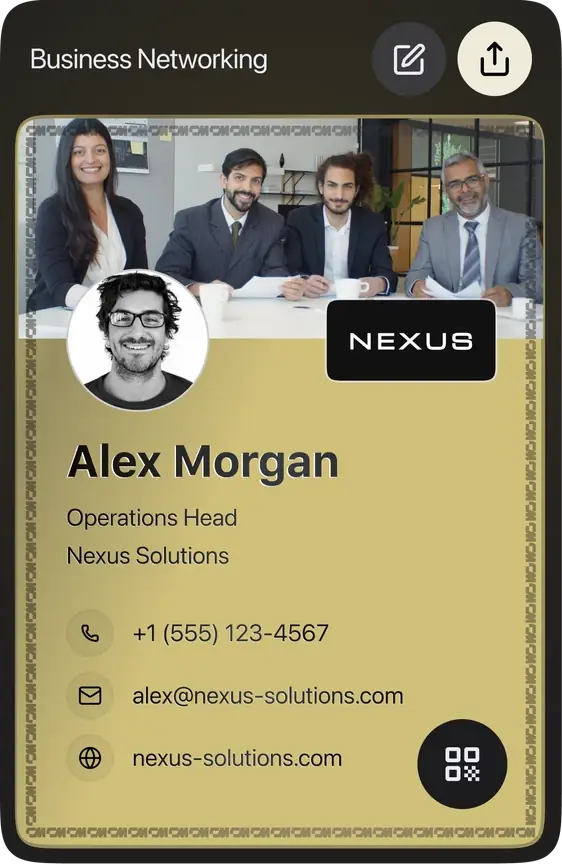
用一句话介绍自己,AI 名片生成器帮你填好电子名片。核对无误后,即可通过二维码或链接分享。
填写工作邮箱,我们会自动带入公司名称、Logo 和网站,其余信息根据你写的内容填写。创建名片前,所有内容都可以修改。
你的信息
核对 AI 填写的内容,并补充你的电话或邮箱。输入时预览会实时更新。
我们已根据链接预填了部分信息。请核对信息,添加你的邮箱或电话,然后创建名片。




你将得到
一张在线电子名片,自带专属分享链接和二维码;可下载名片和二维码的 PNG 图片;还能用我们的免费 Wallet 工具把名片加入 Apple Wallet 或 Google Wallet。
哪些功能需要账号
保存名片时,系统会用你的邮箱或手机号创建一个免费的 ConnectMachine 账号。之后用一次性验证码登录,即可在网页端或 iOS、Android 应用中编辑名片。免费版不收取月费。
AI 如何填写你的名片
用一两句话介绍自己:你是谁、做什么、在哪里。AI 会读取内容,填写你的姓名、职位、公司和从你所写内容中提取的简短简介,以及你写到的电话、邮箱、网站或社交账号。每个字段都可以编辑,创建名片前可以修改职位或重写简介。
AI 只使用你写的内容。如果你填写了工作邮箱,我们会根据邮箱域名查询公司的公开信息,在 AI 留空的地方补上公司名称、网站和 Logo。你没写到的信息,对应字段会留空,由你自己填写。
名片可以怎么用
- 用二维码分享:对方用手机相机扫码,即可保存你的联系方式。
- 用链接分享:粘贴到微信、LinkedIn 或短信中发送。
- 加入 Wallet:用免费 Wallet 工具把名片放进 Apple Wallet 或 Google Wallet。
- 放进邮件签名:用邮件签名生成器,在每封邮件中附上名片链接。
AI 电子名片与 AI 印刷名片设计
这个工具制作的是电子名片:一个包含你联系信息的移动端页面,可通过二维码或链接分享。它不设计可打印的名片,也不提供印刷文件。如果需要交给印刷厂的名片,请使用印刷设计工具,并用vCard 二维码生成器把名片二维码印在上面。
常见问题
免费。生成、编辑和分享电子名片都不收费,没有试用期,也不需要信用卡。
电子名片
随身携带你的电子名片
同样的信息,可通过二维码或链接分享。可在网页端或手机应用中编辑。
Not saved. You've already created a free card with this email. To edit it or make more, sign up in the free ConnectMachine app first, then log in here on the web with the same email or phone number. Get the app and log in to save



Live Preview
实时查看你的名片效果。
We built more for you
Your details were enough to build all of them. Pick any one below to preview, download or edit it.
WALLET PASS
WALLET PASS
Keep your card in your phone
The same details as an Apple or Google Wallet pass. Open it at the table and they scan the QR — no app, no typing.
Sent. Open the email on your phone and tap add.
Wallet passes can only be added from a phone. On a laptop, email it to yourself.

EMAIL SIGNATURE
EMAIL SIGNATURE
Add it to your email in 30 seconds
Copy the signature, then follow the short guide for your email client.
Let us get your email signature set up!
Hi Team, I wanted to share my updated contact card containing our brand new email signature guidelines. Looking forward to our launch next week! Best regards,
MY CM PAGE
VIRTUAL BACKGROUND
VIRTUAL BACKGROUND
Your virtual background is ready
Download it, then set it as your virtual background in Zoom, Meet or Teams.
PNG · 1920×1080 · free to use anywhere
LINKEDIN BANNER
LINKEDIN BANNER
Your LinkedIn banner is ready
Download it, then add it as your cover image from the camera icon on your LinkedIn profile.
PNG · 1584×396 · no watermark
VCARD QR CODE
VCARD QR CODE
Your vCard QR code is ready
A business card with your code on it. Anyone who scans it can save your contact in one tap.
SVG · 3.5 × 2 in · ready to print
这张名片可以在网页端或
扫码下载
免费 • iOS & Android
请使用相同的邮箱或手机号码注册
For AI agents
Plain steps for an AI assistant using this page. The same data is in the JSON script #cm-agent-result.
扫码打开你的名片
调整头像
拖动可调整位置,用滑块或双指缩放。